Code 19, missing CD drives, iTunes and you

Code 19, missing CD drives, iTunes and you

I recently rebooted my PC and noticed my CDRom drives had all disappeared.  Not only that, but the machine was acting strangely too.  I looked at the drives, and saw each of the devices was disabled with this message:

Code 19: Windows cannot start this hardware device because its configuration information (in the registry) is incomplete or damaged

A quick Google turns up this article:

A registry problem was detected. This can occur when more than one service is defined for a device, if there is a failure opening the service registry entry, or if the driver name cannot be obtained from the service registry entry.

Try these options:

  • Click Uninstall, and then click Scan for hardware changes to load a usable driver.
  • If the device is a CD or DVD drive, follow the procedure in Article ID 929461 on the Microsoft Web site (http://go.microsoft.com/fwlink/?LinkID=192798).
  • Restart the computer in Safe Mode, and then select Last Known Good Configuration. This rolls back to the most recent successful registry configuration.

When that didn’t work, I followed the link to article 929461 and tried this:

To resolve this problem, remove the affected filter drivers. To do this, follow these steps:

  1. Click Start, type regedit in the Start Search box, and then click regedit in the Programs list.
  2. If you are prompted for an administrator password or confirmation, type your password or click Continue.
  3. Locate and then click the following registry subkey:
    HKEY_LOCAL_MACHINE\SYSTEM\CurrentControlSet\Control\Class\{4D36E965-E325-11CE-BFC1-08002BE10318}
    There can be many instances of the registry subkey that is mentioned in step 3. You must make sure that you are in the appropriate registry subkey before you change the UpperFilters and the LowerFilters values.
  4. To verify that you are in the appropriate registry subkey, make sure that the Default value is DVD/CD-ROM and the Class value is CDROM.
  5. If you see UpperFilters in the pane on the right side, right-click UpperFilters, and then click Delete.
  6. Click Yes to confirm the removal of the UpperFilters registry entry.
  7. If you see LowerFilters in the pane on the right side, right-click LowerFilters, and then click Delete.
  8. Click Yes to confirm the removal of the LowerFilters registry entry.
  9. Exit Registry Editor, and then restart the computer.

When I did this, I found that Upperfilters pointed to GEARAspiWDM.sys.  The Lowerfilters pointed to a program I knew.  In searching for GEARAspiWDM.sys, Google reveals:
http://www.file.net/process/gearaspiwdm.sys.htm

Many of the comments imply this file and service comes with iTunes.  Sure enough, I had just un-installed of iTunes 11 and the done a fall-back install of iTunes 10.7 (due to the fact they broke drag-and-drop).  I removed the filter and then remove/added each drive in turn.  The drives returned like normal and the system returned to full performance.

Thanks again Apple – for your cr*ppy iTunes software.


Getting Intel’s HAXM hardware accelerated Android AVD running on your system

Getting Intel’s HAXM hardware accelerated Android AVD running on your system

One of the (frankly) terrible aspects of doing Android development is the horrendously slow Android emulator. This is especially true if you do OpenGL ES development.  Fear not!  Intel has come to the rescue.  They’ve released HAXM (Hardware Accelerated Execution Manager) that dramatically speeds up your Android development and emulation.  Best part is that it’s free. The amount of time you’ll save on app start up alone makes it worth every moment you’ll spend setting it up.

Setup:

  1. Install Eclipse as your normally would
  2. Open the Eclipse SDK Manager.
  3. Install one of the latest Android API packages with two important points:
    1. The API level MUST INCLUDE AN INTEL X86 ATOM SYSTEM IMAGE (API 17 at the time of this writing).
    2. Also select the HAXM support.  Found in: ‘Extras’->’Intel x86 Emulator Accelerator (HAXM)’
      Untitled
  4. After those packages are all installed, close the manager and open Eclipse.
  5. Open a workspace and get an app ready to test (use one of the samples if necessary)
  6. Go to: Run->Run Configurations
  7. Right-click ‘Android Application’ on the list on the left and select ‘New’
  8. I named mine Standard_Run_Configuration – but you can name yours whatever.
    Untitled2
  9. Put the project name in the Project box (mine was AndroidCubeStart)
  10. Select the ‘Target’ Tab.
  11. Select the ‘Automatically pick compatible device…” option, then select the ‘Manager’ button.
    Untitled3
  12. At the Manager pane, select ‘New…’
  13. Fill out the AVD with these notes:
    1. Target MUST be one of the API target levels that has the Atom system image (see step 3)
    2. CPU/ABI must be Intel Atom (x86)
    3. In the ‘Emulation Options’ list, select ‘Use Host GPU’
    4. Select OK to save
      Untitled5
  14. You should see your new AVD listed when you’re back at the Android Virtual Device Manager page.  To test it, select it from the list and then press the ‘Start…’ button.
  15. If all goes well, you should have your hardware accelerated AVD emulator.   You should notice that the emulator runs orders of magnitude faster than the standard emulator!


Common problems:

I had the problem where this message appeared when I tried to run the emulator.

emulator: Failed to open the HAX device!
HAX is not working and emulator runs in emulation mode
emulator: Open HAX device failed

To fix this, I tried a number of things that didn’t work, but manually installing HAXM fixed it:

  1. Close Eclipse and Eclipse SDK manager, but still make sure you’ve got the Extras->HAXM installed in the Eclipse SDK Manager (as you did in step 3 above).
  2. Go to the Intel HAXM download page:
    http://software.intel.com/en-us/articles/intel-hardware-accelerated-execution-manager/
  3. Run the install package to the normal locations.
  4. Restart Eclipse and see if you can run the emulator via going to ‘Run’->’Run configurations’.  This time it worked for me.  You should see something like this from the message window if your HAXM is running in hardware accelerated mode.
Starting emulator for AVD 'ARM-HAXM'
emulator: device fd:756
HAX is working and emulator runs in fast virt mode
creating window 0 0 480 800
Programming a new remote entry key fob for a 2004 Mazda 6

Programming a new remote entry key fob for a 2004 Mazda 6

Had one of my key fobs die and had to replace it.  Question is – how do you program the car and key fob to work together?  Turns out the process is quite entertaining.  People wonder what the heck you’re doing when you’re following this procedure out in front of your house on a well-traveled street.

Makes one wonder what other secret codes are available for your car…

Step 1: Open drivers door and leave open.

Step 2: Lock and unlock the drivers door using the power door lock switch on the door.

Step 3: Insert key into the ignition.

Step 4: Turn key to on position and return to off position. (IMPORTANT – use ON position NOT ACC position). Do this 3 times within 10 seconds. Leave key in the ignition.

Step 5: Open and close the drivers door 3 times. (Door should be left open after this step).

Step 6: ECU should respond by locking and unlocking the doors.

Step 7: Press any button on remote #1. ECU responds by locking and unlocking the car doors.

Step 8: Press any button on remote #2 (etc.) Each time the ECU will respond by locking & unlocking the doors.

Step 9: Remove the key from the ignition and the ECU will respond a final time with a series of door locks and unlocks. You’re done!

http://forum.mazda6club.com/electrical/119494-keyless-remote-entry.html


Don’t bring liquid nitrogen to a pool party

Don’t bring liquid nitrogen to a pool party

Jägermeister party organizers in Mexico decided to dump some liquid nitrogen into a pool to emit a bunch of cool smoke. No problem right? Cool steam effects right?
Wrong – 8 people were taken ill and one left in a coma after the nitrogen displaced the air right above the water and knocked them all unconscious.

That’s why knowing chemistry is important. It could save your life at your next bro-fest.

Freefall is where you learn to fly…

Freefall is where you learn to fly…

“I was raised as a type-A person that won love and approval from my family by my accomplishments and achievements at school and professionally. It’s how I thought the whole world worked.

But when my autistic son was born, I had someone that wanted to know if I could love them for simply who they are, not what they could accomplish or do (or not do). This was the first glimpse I had into what unconditional love must be like.

You have to set aside all those expectations and learn to live and love with whatever you are dealt. You first feel like your life has gone into freefall. But you must remind yourself again and again that freefall is where a bird first learns to fly.”

Innocence lost…

Innocence lost…

“It is more important that innocence should be protected, than it is that guilt be punished; for guilt and crimes are so frequent in this world that all of them cannot be punished…. But when innocence itself is brought to the bar and condemned, especially to die, the subject will exclaim, ‘It is immaterial to me whether I behave well or ill, for virtue itself is no security.’ And if such a sentiment as this were to take hold in the mind of the subject that would be the end of all security whatsoever…”

-John Adams

Shooting cannons and sailing tall ships in the Columbia

Shooting cannons and sailing tall ships in the Columbia

I went on a battle sail event near Astoria in the mouth of the Columbia last weekend and I got to sail tall ships we shot cannons at each other.  It reminded me of the last scene in the movie Goonies in which One-Eye’d Willy’s ship sailed off into the sunset off the Oregon coast.  It was an amazing experience and I was very surprised by the maneuverability and agility of these ships.  It was great to see the crew in action too.

These events were put on by Gray’s Harbor Historical Society: http://historicalseaport.org/   They maintain the ships and do lots of educational programs.  They travel up and down the West Coast doing sailing, demonstration, and battle events just like this.  For the cost of a ticket, you too can ride along.  There are two ships full of 20-somethings that are all living aboard and spend their days sailing, doing tours, and maintaining the ships.  What an interesting lot to say the least.

The entire adventure took 3 hours.  We all met at the dock and sailed out into mouth of the Columbia from Ilwaco, WA.  While at Ilwaco, I decided to run out and stop at a humorously named location:
IMG_9330

This name came (purportedly) from the Lewis and Clark expedition.  They came to this cape regularly to look for ships to take either them, or at least their logs, home.  Unfortunately, no ships appeared in the many long, rainy, wintery months they spent on the coast.

But back to sailing.  We met the ships on the dock.  After lining up and picking which ship we wished to ride on, we motored out of the harbor.  I chose the Lady Washington – which was a much more period accurate ship.

IMG_9296

After heading out to the opening of the Columbia we unfurled the sails and started shooting cannons.

IMG_9355

Here’s some of the actual battle sail footage:

After about 2 hours of sailing around shooting cannons at each other, we decided to head home.  On the way back, as the sun set, we started singing sea shanties:

 IMG_9424

Overall, it was a fantastic time.  I completely recommend it and it was totally worth the price of admission.

Probably one of the most cool moments had to be when we were in the middle of the battle sail.  A large freighter was making its way out of the Columbia River.  We’re talking a huge container ship freighter.  What in the world must they have thought passing by 1700’s era tiny wooden sailing ships shooting cannons at each other…

DOSBox, bad \, /, ” keys and you

DOSBox, bad \, /, ” keys and you

I was fooling around with some old GWBasic programs and needed to use DOSBox the other day.  When using DOSBox, however, I was getting bad characters for \,/,” and various other keys.  This makes using DOSBox almost impossible since you cannot change directories or issue load/save commands since they need the filename in quotes.   Yet the solution to this problem isn’t what you think.  DOSBox provides an internal key re-mapper, but it wasn’t working right and I still couldn’t get the keys I needed mapped.  Often they would just enter blank or incorrect characters.

It turns out the real culprit is a badly selected default Windows keyboard driver. Open your Windows device manager and look for the keyboards.  Often you’ll see one listed as:

“MCIR 109 Keyboard”

Change this driver to “HID Compliant device”
Then restart DOSBox and it should all be working like a champ.

Here’s the thread with more detailed info
http://www.vogons.org/viewtopic.php?t=18465

Finding lost relatives

Finding lost relatives

Our family has a interesting family tree.  On our mother’s side we have a wonderful relative that has been collecting information, letters, visiting home countries, and constructing detailed and far-reaching family trees.  Yet on our father’s side we haven’t done as much of that.

At a recently family gathering, a few relatives on that side were reminiscing.  In the course of the discussion, it was revealed that one of the branches lead to family that lived in Portland, OR.  An aunt remembered they were buried in a cemetery ‘overlooking the Willamette’.

Well, there are a lot of cemeteries that could fit that description, but we felt odds were good we could find them with some internet searches.  Turns out, however, they were not listed anywhere I looked.  Instead, a cousin managed to find them at the Wilhelm Memorial Mausoleum – made famous partly by Chuck Palanuck’s book “Fugitives and Refugees: A Walk in Portland, Oregon”.  Unfortunately, when I had looked them up via their online search page – they weren’t listed.  A testament to the fact that not all information is on the internet.

I have had some time off the last few days, so I called them up and went over just before closing time.   The mausoleum buildings were very nice and somewhat extensive on the ridge of the hill in the Sellwood district of Portland.  Yet, like an iceberg, this was only the tiny visible tip of a much, MUCH larger structure.  The greeter gave me a map and told me where I could locate them.  I was buzzed into the crypts and went to find them.

IMG_9464 IMG_9502 IMG_9497

First off, the place is MASSIVE.  There are at least 5 floors that extend through the hillside.  Room after room of crypts.

IMG_9468 IMG_9471IMG_9492 IMG_9493 IMG_9495 IMG_9469

I finally arrived at The Hall of Apostles – where I was told they were buried.

IMG_9473 IMG_9475

And here they are:

 IMG_9480 IMG_9478

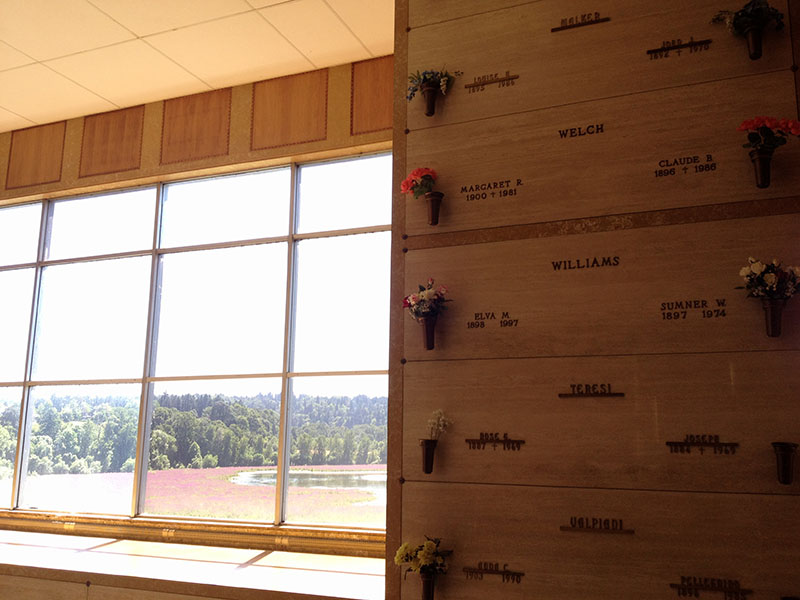
One of my aunt’s remembered that Claude had said he would be buried in a spot where they could overlook the river – and sure enough – this was the view.

IMG_9482 

African Air

African Air

Looked through the African Air photography book by George Steinmetz.  One of the best parts was the introduction. It had one of the most powerful quotes I saw.

In Steinmetz’s intros, he describes how he exited college and hitchhiked across Africa for over two years.  Most of the time completely alone, no knowledge of the language or customs, battling illnesses and unrest, and often found himself sleeping on police station porches or living off the generosity of locals who he couldn’t even talk with.  It was there, with almost no knowledge of how to even use a camera, he started shooting photos.  Those early pictures are an fascinating catalog of visceral encounters.

On returning to the states, he managed to get a meeting with Bob Gilka of National Geographic’s photo department and get some kind of job with National Geographic.  Gilka is apparently famous for his harsh, critical style and a sign outside his office door that said “Wipe knees before entering”

So Steinmetz, after hard years in Africa, he put his photos on the slide carousel. Gilka held the advance button without stopping. This then happened:

He stopped once when he saw a photo he didn’t like.  “Doesn’t work” he said curtly.  I tried to explain some of the difficulties of the situation but he cut me off.

“Is that an excuse?” he asked.
“Uh, I guess so,” I said.
“Well, we publish photographs here, not excuses.”

Ouch.

Wow.  What an introduction to the professional world; however, it really helped Steinmetz in the end.  Gilka admired Steinmetz’s tenacity and determination; but told him to come back when he’d learned more photographic techniques, how to use artificial lighting, and could handle a wider variety of situations.

I guess it’s always a good reminder to me that to be good in your business/field – you should look at it that way.  Don’t make excuses, make improvements.