Was just accepted into the Mazamas Basic Mountaineering course. It’s about half classroom training to learn about outdoor survival and safety; and the other half training and hiking to get you in shape for mountain climbing. I must admit that I’m looking forward (with some anticipation) to the idea of climbing Mount Hood at the end of the course…
Snowstorm 2011!!! OMG were going to die!!! = 1.5 inches
It started with predictions of Snow-pocalypse. Portland was going to get creamed with snow – mountains of it. Multiple days of snow and ice that would result in stranded people, folks without heat or power, etc. Newcasters went on and on and on about how terrible it was going to be. 4-6 inches overnight with another solid 24 hours of more snow. Then it was 2-4 inches, then day before it was 1-2 inches. Then the night began, and the snow that was supposed to start at 3pm was still unseen as I walked home from a night of free-play at Ground Kontrol around 9pm. Queue sleep and wake the next morning:
So, we did actually get snow on Thursday morning, and untouched side streets that the sun wasn’t shining on were slippery, but by 10am it was all melted anywhere you went. Still, the local news crews were out doing hard-hitting, on the scene reporting in the 1.5″ official of snow laying around on the streets despite the fact there was a palpable air of desperation in their tone as they tried to play up what was clearly no snow-pocalypse. And the snow that was supposed to fall all day and night of Thursday? Well, it’s sunny right now on Friday and there was absolutely no snow yesterday or overnight. None.
Don’t get me wrong, up in the mountain passes and some of the local hills snow can turn the steep, unsalted/un-deiced streets into a real hazard you don’t want to drive on without studded tires. And if you’d gotten ALL the normal drivers out on these roads, it probably would have been a never-ending string of pileups due to drivers unaccustomed to driving in snow (I saw 2 cars off the road on a 1/2 mile stretch of icy pavement due to folks still driving like they are on dry pavement).
All this I could forgive if it was an isolated instance. But this seems to happen any time the hint of snow is predicted for our area. So if there’s one take-away I’ve learned from Oregon weather forecasters in the last 10 years – it’s this: don’t believe them when they predict snow-pocolypses *days* in advance. Check out weather.com yourself and watch the changing predictions there up to the day it’s supposed to happen. Till then, don’t change any of your plans.
O’Reilly publishes a lot of nerdy books, and right now they’re having a contest to win up to $500 of their books. You register on their website and publish your wish list to your blog (like this), and you get entered into a chance to win those books!
Here’s my list (which adds up to $497.83) 🙂 I sure hope I win!
Error during Install:
If you try to install Fedora Core 14 on VMWare and use the wizard which automatically sets up the VMWare settings, shortly after booting the install DVD, you’ll get a fatal error:
Section does not end with %%end
Go to VMWare, and for the Fedora list VM:
Go to settings -> CD’s and DVD’s-> (here will be two CD/DVD setup) delete or unset the cd/dvd whose disc image is autoinst.iso
Reboot the install, and all should go as expected.
VMTools
Also, VMWare Tools (VMTools) won’t install correctly by default. You’ll need to follow this procedure:
http://www.sysprobs.com/fedora-14-vmware-install-vmware-tools-fedora-14
So, your machine is bluescreen-ing on a semi-regular basis. It’s annoying the @#$% out of you, but you can’t find anything in the system logs that indicates what’s causing it. Maybe (like in my case) the computer in question is your DVR box and sometime during the night Media Center is waking up, trying to update a program guide, and then blue-screening. Nothing helpful is left in the logs, but you did get a minidump file. If you get a minidump, my friend, you are in business!
Make sure you have a minidump file with your bluescreen. You should see a numbered file with the .dmp extension with the date/time for the bluescreen located in C:\Windows\Minidump
Download a handy free tool called BlueScreenView by Nirsoft. This handy tool will automatically decipher a minidump file and you can verify that it matched what you saw on the blue-screen. It won’t give you everything you need, but it will tell you if you have the right mini-dump for the crash you saw. It also shows you the codes thrown so you don’t have to write them down by hand at the bluescreen. You’ll note that often BlueScreenView reports a source of the error (ntkrnl.exe in my case) but this is usually NOT the real root cause. As we’ll soon find out, the high-level source it cites isn’t always the real problem, but was a module loaded BY that source or the module in which the source was loaded.
Do these one-time setup steps. In order to make sense of the minidumps, you need some tools provided by Microsoft:
Download and install the Debugging Tools for Windows pack. Make sure it gives you the right version for your OS (win7 x64, vista x32, etc). This pack contains the kernel debugging tools you’ll need.
windbg.exe will likely be installed in c:\program files\Debugging Tools for Windows (x64) (or whatever x32/x64 you have)
Open a command prompt as administrator, CD to the windbg.exe directory
run: windbg.exe -IA
windbg will start up, and inform you that it is now the registered file association handler for all dump files. Close windbg.exe
Restart windbg, and go to file->Symbol File Path
Enter: SRV*C:\Development\SymCache*http://msdl.microsoft.com/download/symbols
You can set the local directory ('C:\Development\symcache' in my case) to whatever you want, but everything following the rest must be exact. This instructs windbg to load the needed symbols from Microsoft’s internet site (release modules usually don’t have symbols, and letting you recompile your own kernel by giving the source out isn’t something MS usually lets you do. :)) Whenever you debug something and windbg needs the symbols, it checks your cache location first and downloads the needed symbols if they are not found and stores them in the cache. So the more you debug the more symbols you build up and faster future debugging will go. Exit windbg and save the settings.
Open windbg.exe (again), and do a file->open dump and open the minidump in c:\windows\minidump that corresponds to the bluescreen you’re trying to debug. You might need to be administrator when starting windbg.
Windbg will automatically start downloading symbols, and doing some basic analysis. It may look like it’s done/just sitting there sometimes, but don’t do anything until you see it’s ‘diagnosis’. Usually looking like this: Use !analyze -v to get detailed debugging information.
BugCheck 9F, {3, fffffa800af7f440, fffff80000b9c4d8, fffffa800745f860}
Probably caused by : usbhub.sys
But don’t take this as the final word on the crash source and send nasty letters to the usbhub.sys driver writer! Type !analyze -v as it suggest, and you’ll likely get a more detailed analysis, like this:
DRIVER_POWER_STATE_FAILURE (9f)

A driver is causing an inconsistent power state.

Arguments:

Arg1: 0000000000000003, A device object has been blocking an Irp for too long a time

Arg2: fffffa800af7f440, Physical Device Object of the stack

Arg3: fffff80000b9c4d8, Functional Device Object of the stack

Arg4: fffffa800745f860, The blocked IRP

Debugging Details:

------------------

DRVPOWERSTATE_SUBCODE: 3 IMAGE_NAME: usbhub.sys

DEBUG_FLR_IMAGE_TIMESTAMP: 4a5bcc2d

MODULE_NAME: usbhub

FAULTING_MODULE: fffff8800767a000 usbhub

CUSTOMER_CRASH_COUNT: 1

DEFAULT_BUCKET_ID: VISTA_DRIVER_FAULT

BUGCHECK_STR: 0x9F

PROCESS_NAME: System

CURRENT_IRQL: 2
Now we see the whole story. We see that in the usbhub.sys device driver, something listed in it’s ‘DPC’ table failed to respond in time to some request the usbhub.sys made. That process was put on the timer expiration list which threw the bluescreen. Since usbhub.sys is a hub with many things plugged into it, odds are good that the DPC list is the list of device drivers for each device plugged into the hub, a list of events that need handling, or a list of devices themselves. When we look at the ‘failure bucket’ we see the AiCharger_IMAGE_usbhub.sys device was the source of the failure. Odds are good the usbhub.sys is loading ‘images’ that contain the device’s driver for each of the devices plugged into the hub; and the one that failed in this case has the name AiCharger. If I look in my Device Manager in Windows, I find a driver called AiCharger.sys – under the USB devices. Ah ha! A quick Google reveals this is a driver that enables smart/high-speed USB charging of iPhone/iPod devices on my Asus motherboard. If I go one step further, I can speculate that the bug is in the portion of the driver that is supposed to respond to sleep/wake/power events and that somehow the call to wake up the iPhone I have plugged in isn’t responding. Dang – Asus owes me a donut for doing all the work for them.
So, now you know who’s really responsible. You send a bug note to Asus with the dump results and un-install the AiCharger tool/stop leaving your iPhone connected at night to the machine when it’s asleep until they get a fix for AiCharger. You also find out that someone else already had the same problem…
There are many other debugging commands you can also use, and those are all outlined here. Hopefully this will help YOU out the next time some crazy bluescreen you can’t figure out; and you won’t be re-installing the OS to get rid of it.
Protips: 99% of the time, bluescreens are usually a driver and not something in the actual Windows system. Especially if they are repeatable. Always get the latest drivers first.
When the crashes are wake/sleep/resume/power related, often you should go to the device driver in the Device Manager and uncheck any ‘allow system to turn off the power of this device’ as a second step if the latest driver doesn’t solve it. This prevents Windows from making calls into possibly faulty driver code. Power mangament issues are very common with drivers still.
If you get dumps and the crashes are different places every time or random in timing – then you might have bad memory or a bad motherboard that’s corrupting things. Check heat sinks or temps and possibly change ram/mb’s.
-Microsoft Answers forum that has really responsive and informative threads on just about every blue-screen investigation ever done. These guys chew up minidumps all day and can help you track down just about anything that’s going on (if just searching the forum doesn’t do it for you automatically): http://social.answers.microsoft.com/Forums/en-US/w7repair/threads
Yeah, so you automatically got the newest driver for your Canoscan when upgrading to Windows 7. However, when you go into Photoshop CS5, you no longer see TWAIN devices listed(!). Unfortunately, in Adobe’s infinite wisdom, they have discontinued installing TWAIN support by default. You need to go here:
You might already know this, but this is for those of you that want to compile extra-fast on your multi-core beast. Bet you didn’t know that by default, most versions of Visual Studio do NOT use multi-core compiling. So, to turn it on, do this in visual studio:
Tools > Options > Projects and Solutions > Build and Run > maximum number of parallel project builds
Set this to the number of cores you have (or the number of cores you have -1 if you want to do things on your desktop while compiling extra-big things).
To see if it’s working, when you compile, in the compiler output window at the bottom you should see each line prefixed by a number like this:
1>blahblah
4>blahblah
3>blahblah
Those prefix numbers tell you which ‘core’ the message is coming from. I find this speeds up your compile times dramatically – especially on large projects. Give it a try!
Assault at Brecourt Manor tactician, Major Richard Winters, has died
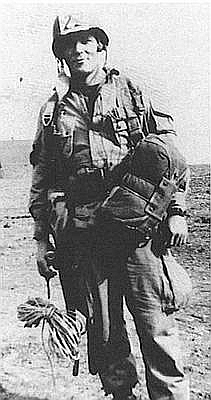
Major Richard Winters, commander of Company “E”, 2nd Battalion 101st Airborne during World War II and the character who was the basis of the Band of Brothers series, died this Jan 2nd, 2011.
I personally found the Band of Brothers series to be one of the best war-based TV series created in recent years; and Winter’s successful assault on the fortified gun positions at Bercourt Manor (that was depicted in tremendously accurate detail in Episode 2 – Day of Days) during D-Day landings launched him into near instant fame. He continued on up the ranks during the war because of his excellent tactical and personal leadership. The assault was featured as a major part of one of the Band of Brothers episodes which had a nearly exact re-creation of the events and assault. The assault was so well executed and planned that it’s still studied in West Point as a textbook study in how to attack a fixed position. This assault even made it into mods for various FPS games and it even became an official mission in the Call of Duty series.
I was intrigued to find out what the strategy was, but could not find any details of the actual tactics. Well, look no further. I finally found a site that shows the step-by-step account of the attack. Here is the detailed flow of the assault in very easy to follow diagrams. It appears that site is not being maintained and increasingly broken, so I’ve copied it below.
Personally, I’m continually amazed by a dichotomy of reading about combat tactics and the reality of the performing them on the ground. While these situations are studied from perfect aerial views with everything clearly marked, the reality is that everything is seen and evaluated at ground level. A great tactician has to survey covertly without being spotted, without knowing anything about hidden emplacements, without being able to see actual numbers, and usually with only partial views with key pieces blocked by obstacles. He must have an intimate and cold evaluation of his mens’ training and weapons’ capabilities. He has to gather this information while laying in mud or thickets – sending men around only so far as they can recon without being seen. This soup of input is then processed and a plan churned out instantly; often in the heat of battle. As the assaults progress, they must re-evaluate and keep moving very quickly using tactics of misdirection and hitting positions before they can re-adjust to the assault. As an avid player of FPS tactical games like Counter-Strike, I see how this is like poetry in motion when you get hooked up with a good team that can sense the shifting positions and anticipate counter-assaults. They know when to rush and when to shift. I find this an amazing skill; and one I’ve always wanted to learn more about.
To see how this looks in action, I present to you the Assault on Guns at Brecourt Manor as shown in Band of Brothers Episode 2 (note: these videos sometimes break if they get copyright takedown notices – just search for the title on YouTube and you’ll find others).
Below the videos is the battle flow diagrams.
<edit June 11, 2022>
Also, there are a number of videos made about the assault on YouTube as well.
Major Winters talks about the assault:
Review on the site and flow of battle at the actual location:
Bill Gaurnere revisits Brecourt Manor
Here are the charts, since the original link seems to be falling apart.
Location of Brecourt Manor in relation to Utah beach.
And here is the flow of battle:
After a night of havoc with sporadic contact with the enemy, Lt. Richard Winters, Easy Company (506 P.I.R.) managed to collect some of his men and men from other companies. He had landed on the northwest corner of Ste. Mere Eglise and steadily made his way, picking up others, to the east towards the beaches and then south. Eventually he assembled with larger numbers, and moving southward from Le Grand Chemin enemy contact was made; just south of Le Grand Chemin and north of Brecourt Manor a battery of 105 mm guns was shelling Utah Beach. Without realizing most of E Company was still making its way to the assembly point, Lt. Winters was ordered “to take his men” and knock out the placement. Knowing little more than the placement of a machine gun and one artillery piece, Winters and his force of 12 men moved south (Koskimaki, 230 – 231). On scouting the area, Winters found that there were actually four 105 mm guns connected by a trench network and defended from a distance by a collection of German MG42 nests.
Upon arrival to close proximity to the battery, Lt. Winters set up two 30-caliber machine gun positions to act as bases of fire. Pvts. Joe Liebgott and Cleveland Petty were assigned one position, while Pvts. John Plesha and Walter Hendrix manned the second. Sgts. Mike Ranney and Carwood Lipton were sent northwesterly (past the old truck and rubbish pile) to establish covering fire as well. Lipton, with limited visibility, climbed a tree for a better view, but in an exposed position. Sgts. Bill Guarnere and Don Malarkey accompanied Lt Buck Compton down the tree line in a flanking position of the German MG42 nest.
Pvts. Joe Liebgott and Cleveland Petty were given the order to commence firing. Lipton and Ranney also began harrassing fire from the tree position. Meanwhile Compton, Malarkey and Guarnere were in position to attack from the German machine gun’s right flank…
…from the gun’s right flank they threw grenades and began charging in thus knocking out the MG42. Lt. Carwood Lipton later recalled, “And then, just like in the movies, I saw Compton and Guarnere running in and throwing grenades with almost every step.” (Koskimaki, pg. 230)
Winters, along with his group (1) then charged along the tree line then out through the field to the trench system. The Germans in gun position one were overwhelmed…
…and abandoned the first gun position. What German infantry was left retreated south in the trench system towards the next gun and south across the field towards Brecourt Manor only to be fired on in the open. Contrary to the HBO series depicting Lorraine has having trouble hitting a retreating German, it was Bill Guarnere who actually missed his man. “Guanere missed the … Jerry, but Winters put a bullet in his back. Guarnere followed that up by pumping the wounded man full of lead with his tommy gun.” (Ambrose, 98)
The assault team now began to take fire from a line of MG42 nests located in the hedges to the west and southwest. Additionally the Germans in the next gun position began to fire and throw grenades. It was here in the north end of the trenches, as gun one was taken and about to be destroyed, that Popeye Wynn was injured by grenade, and Joe Toye had two close calls.
With the first gun under control, the attack on the second gun was put into place, but Winters, sensing a counterattack, checked the trench system. “I flopped down and by lying prone I could look through the connecting trench to the next position, and sure enough there were two of them setting up a machine gun, getting ready to fire. I got the first shot in however, and hit the gunner in the hip. The second…in the shoulder.” (Koskimaki, pg 232)
The MG42 fire from the west across the field was almost non- stop at this point, so all activity was limited to a crouch in the trench system. Lipton made his way up to the first gun only to discover that he had left his musette bag with explosives behind. He left, as ordered, to retrieve his bag.
Winters now ordered the assault on the second gun. Leaving three men on the first 105, Winters led five others in a charge on the gun. With only one casualty the gun was taken (Ambrose 100). It was at the second 105 position that Winters discovered the radio and map room. This was an important find, as the maps contains locations of every German battery on the Contentin Peninsula. Winters ordered the radios and remaining materials destroyed.
With two guns under their control, Winters ordered the four machine gunners forward to suppress the MG42 fire from across the field. The team was joined by Pvt. John D. Hall of A Company. Hall led the charge on the third gun but was killed. However, the gun was taken (Ambrose, pg. 100). Captain Hester, S3, then joined the team, bringing with him incendiary grenades. Winters ordered all the captured guns destroyed.
Five more men, led by Lt. Ronald Spiers of D Company, arrived to reinforce the effort. Speirs led the assault on the fourth and final gun. The gun was taken but not without the loss of one man, “Rusty” Houch of F Company (Ambrose 101). All guns were now capture and effectively put out of operating order.
With all guns captured and destroyed, Winters ordered a fallback to the original starting point and subsequent retreat to Le Grand Chemin.
Conclusion
“Winters’ casualties were four dead, two wounded. He and his men had killed 15 Germans, wounded many more and taken twelve prisoner; in short they had wiped out the 50 man platoon of elite German paratroops defending the guns, and scattered the gun crews” (Ambrose, pg. 102)
For their actions, Lt Richard Winters received the Distinguished Service Cross, while Compton, Guarnere, Lorraine and Toye received the Silver Star; Lipton, Malarkey, Ranney, Liebgott, Hendrix, Plesha, Petty and Wynn received the Bronze Star (Ambrose, pg. 104).
Permanent magnet that is turned on/off by a knob, transparent concrete, bendable magnets, temperature-changing colored glass? All sounds like science fiction to me. But it’s NOT. Actually BUY these items today:
Arch Robinson just removed almost ALL the volatile keywords from Intel Thread Building Blocks. Why? For several reasons, but mostly because he claims that overall it slows your code, probably does not actually solve the underlying ordering problems if your code needs to be portable (a REAL concern on today’s writing of games/apps for x86, Xbox, PS3, and iPhone devices!), and likely isn’t doing what you think it’s doing anyway. Here’s a pertinent example:
Sometimes programmers think of volatile as turning off optimization of volatile accesses. That’s largely true in practice. But that’s only the volatile accesses, not the non-volatile ones. Consider this fragment:
    volatile int Ready;

    int Message[100];

    void foo( int i ) {

        Message[i/10] = 42;

        Ready = 1;

    }
It’s trying to do something very reasonable in multi-threaded programming: write a message and then send it to another thread. The other thread will wait until Ready becomes non-zero and then read Message. Try compiling this with “gcc -O2 -S” using gcc 4.0, or icc. Both will do the store to Ready first, so it can be overlapped with the computation of i/10. The reordering is not a compiler bug. It’s an aggressive optimizer doing its job.
You might think the solution is to mark all your memory references volatile. That’s just plain silly. As the earlier quotes say, it will just slow down your code. Worst yet, it might not fix the problem. Even if the compiler does not reorder the references, the hardware might. x86 hardware will not reorder it. Neither will an Itanium(TM) processor, because Itanium compilers insert memory fences for volatile stores. That’s a clever Itanium extension. But chips like Power(TM) will reorder. What you really need for ordering are memory fences, also called memory barriers.
So what’s the solution for multi-threaded programming? Use a library or language extension hat implements the atomic and fence semantics. When used as intended, the operations in the library will insert the right fences. Some examples: